Contact Form Section
Combine a contact details sidebar with a built-in form so visitors can reach your team quickly.

Overview
The Contact Form Section provides a structured layout for customer support: a rich-text information column sits beside a customizable contact form. Use it to list phone numbers, store hours, and addresses while giving shoppers an easy way to submit inquiries.
How to add
Steps:
- In the theme editor (Customize), click Add section
- Select Contact Form
- Save
Section Settings
Content
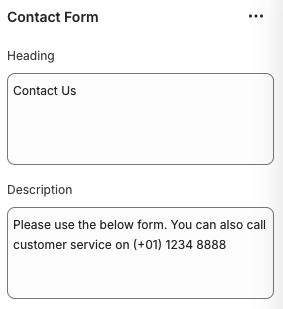
Heading
- Title displayed above the form (e.g., “Contact Us”).
Description
- Supporting text that appears below the heading to guide visitors.
Layout
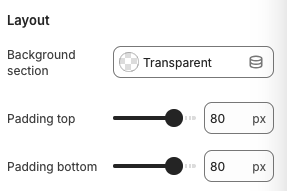
Background Section
- Sets the background treatment for the section (Transparent, Accent, etc.).
Padding Top / Padding Bottom
- Adds vertical spacing above and below the section.
Block Settings
Text Block
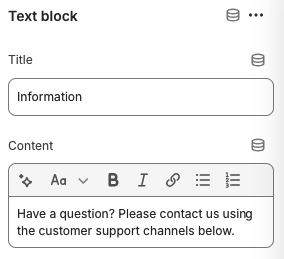
Title
- Optional heading for the information column (e.g., “Information”).
Content
- Rich text area for contact details, office hours, addresses, or other support information.
Contact Form Fields
The form includes inputs for name, email, phone number, and message by default. Additional customization depends on your theme/app capabilities.
Best Practices
- Provide multiple contact options (phone, email, hours) to build trust.
- Keep the information column concise; use bullet lists for clarity when sharing multiple details.
- Clearly state response times or support availability to set expectations.
- Test form submissions after publishing to ensure messages reach your email inbox or CRM.
- Pair this section with a map or FAQ section for a complete support experience.
Troubleshooting
Form submissions not received
- Verify the theme settings for contact forms include the correct recipient email address.
- Check spam folders and ensure no filters block messages from Shopify.
Form validation errors
- Make sure required fields (like email) are filled out correctly; Shopify validates the email format automatically.
Section spacing feels off
- Adjust padding values and consider the layout of adjacent sections for balanced spacing.