Wishlist Products Section
Display the products a customer saved to their wishlist in a customizable grid layout.
Overview
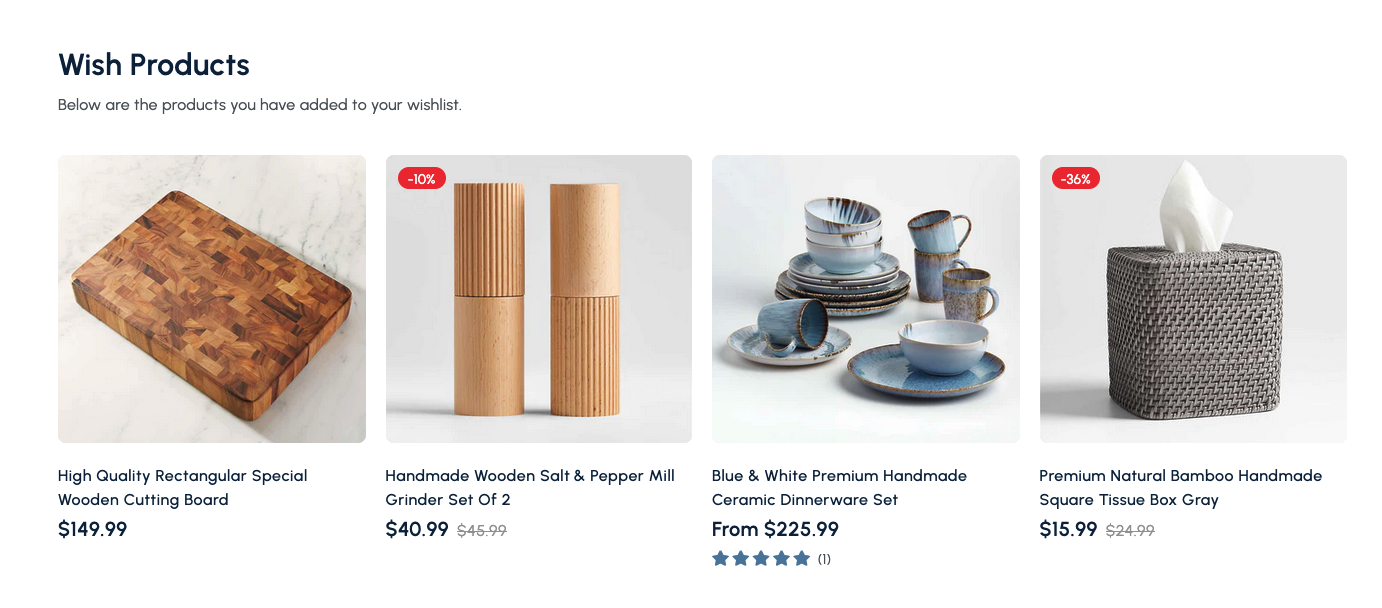
The Wishlist Products Section automatically populates with items a shopper has favorited. It provides a clean grid of product cards so customers can review, compare, and add their saved products to cart whenever they’re ready.
How to add
Steps:
- In the theme editor (Customize), click Add section
- Select Wishlist
- Save
Section Settings
General
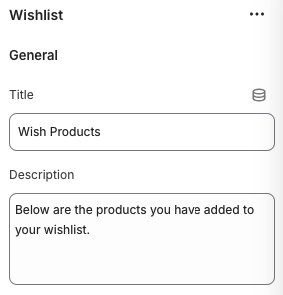
Title
- Heading displayed above the wishlist grid.
Description
- Optional supporting text shown below the title to guide customers.
Layout
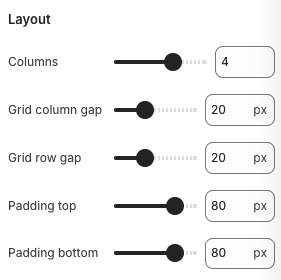
Columns
- Number of product cards displayed per row on desktop screens.
Grid Column Gap / Grid Row Gap
- Adjust horizontal and vertical spacing between wishlist items.
Padding Top / Padding Bottom
- Adds vertical spacing above and below the section.
Product Cards
Wishlist items automatically include:
- Featured product image
- Product title, vendor, and dynamic pricing (including compare-at price when applicable)
- Sale badges when enabled
- Rating stars if product reviews are available
- Add-to-cart or variant selection buttons
Best Practices
- Encourage customers to log in so their wishlist persists across sessions.
- Keep the layout balanced; adjust column count based on how many products users typically save.
- Display sale badges and ratings to increase urgency and trust.
- Pair this section with recommendations or featured collections to inspire additional browsing.
- Include upsell messaging near the wishlist to promote bundles or related products.
Troubleshooting
Section shows no products
- Confirm the customer has added items to the wishlist; the section populates dynamically.
- Ensure the wishlist app or theme feature is properly installed and configured.
Buttons not adding products to cart
- Check for JavaScript errors related to the wishlist or cart scripts; ensure required app assets load on the page.
Grid spacing looks uneven
- Tweak the column count and gap settings to match the number of wishlist items displayed.