TikTok Shop Section
This section displays TikTok products with video integration and social media engagement features.
Overview
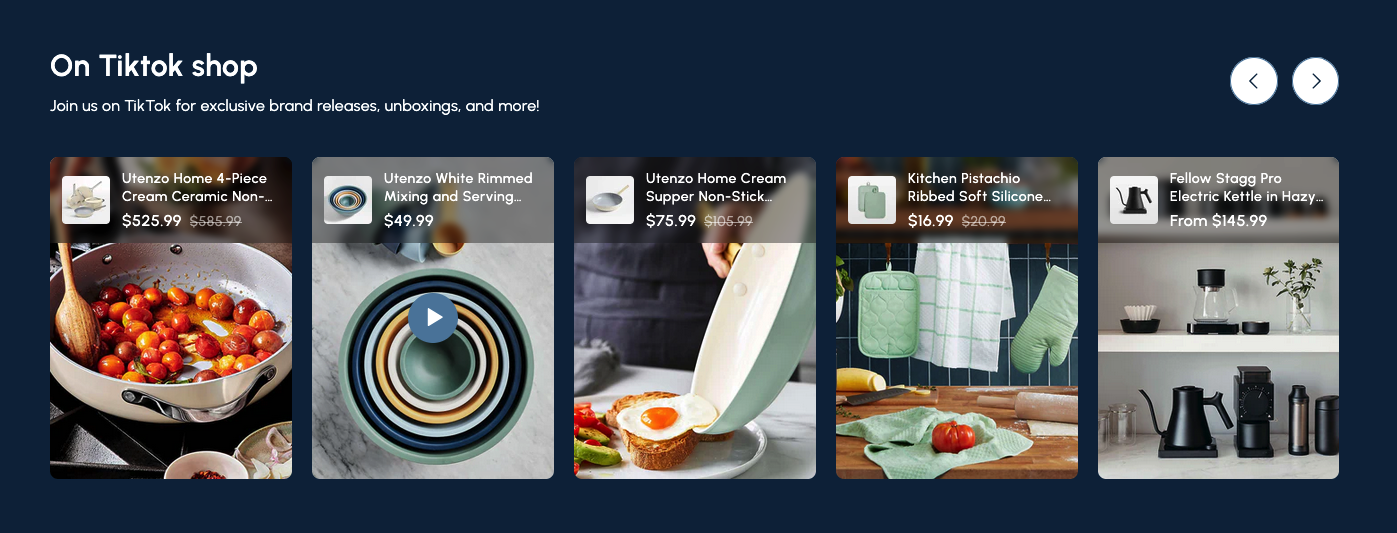
The TikTok Shop Section is a dynamic component that showcases your products with TikTok integration. This section allows you to display products alongside TikTok videos, creating an engaging social commerce experience that connects your Shopify store with TikTok's social platform.
The TikTok Shop Section combines e-commerce with social media by displaying products alongside TikTok video content. It features a horizontal slider layout with product cards that include both product information and TikTok video integration, making it perfect for showcasing products in action.
How to add
Steps:
- In the theme editor (Customize), click Add section
- Select TikTok shop
- Save
Section Settings
General Settings
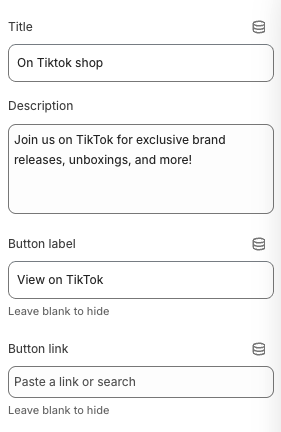
Title
- Main heading displayed above the TikTok shop section
Description
- Subtitle or descriptive text below the main title
Button Label
- Text displayed on the call-to-action button
Button Link
- Destination URL for the TikTok button
Slider Settings
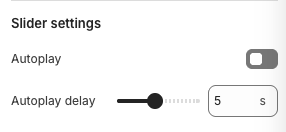
Autoplay
- Automatically advances to the next set of products
Autoplay Delay
- Time between automatic slide transitions
Layout Settings
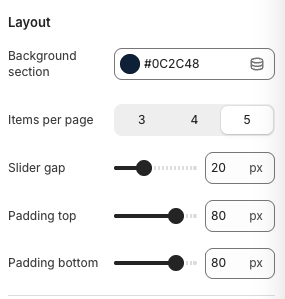
Background Section
- Background color for the entire section
Items Per Page
- Number of products visible at once
Slider Gap
- Spacing between product cards
Padding Top
- Top padding for the section
Padding Bottom
- Bottom padding for the section
Block Settings
Product Settings
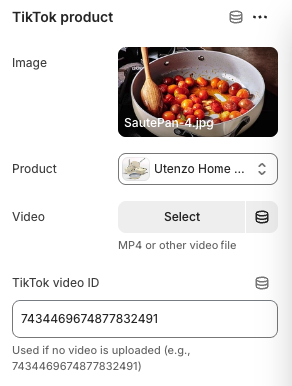
Image
- Format: JPG, PNG, WebP
- Description: Product image displayed on the card
- Example: "SautePan-4.jpg"
Product
- Link to specific Shopify product
Video
- Format: MP4 or other video files
- Description: Custom video file for the product
TikTok Video ID
- Note: Used if no video is uploaded
- Description: TikTok video ID for embedding existing TikTok content
Best Practices
Content Strategy
- Choose products that work well in video format
- Use engaging TikTok videos that showcase products in action
- Create compelling titles and descriptions
- Include clear calls-to-action for TikTok engagement
Video Integration
- Use high-quality product videos
- Keep videos concise and engaging (15-60 seconds recommended)
- Ensure videos showcase product features clearly
- Consider using TikTok trends and hashtags
Product Selection
- Feature products that are popular on TikTok
- Include products with good visual appeal
- Choose items that demonstrate well in video format
- Consider seasonal or trending products
Social Media Integration
- Link to your TikTok profile or specific videos
- Use relevant TikTok hashtags in descriptions
- Encourage user-generated content
- Create a seamless shopping experience
Troubleshooting
Common Issues
TikTok videos not displaying
- Verify TikTok video ID is correct
- Check if video is publicly accessible
- Ensure TikTok embedding is enabled
- Test with different video formats
Products not linking properly
- Verify product exists in Shopify admin
- Check product visibility settings
- Ensure product images are uploaded
- Test product links manually
Video upload issues
- Check video file format (MP4 recommended)
- Verify file size (keep under 50MB)
- Ensure video is properly encoded
- Test video playback before uploading
Layout problems
- Check items per page settings
- Verify slider gap settings
- Test responsive breakpoints
- Ensure proper CSS loading
Mobile responsiveness issues
- Check mobile slider gap settings
- Verify mobile padding settings
- Test touch navigation on mobile
- Ensure videos play properly on mobile
Performance problems
- Optimize video file sizes
- Use appropriate video compression
- Consider lazy loading for videos
- Test page load times