Gallery Images Section
This versatile section allows you to display a grid of images with customizable layouts and links.

Overview
The Gallery Images Section is a visually appealing component designed to showcase a collection of images in an organized grid layout. It's perfect for displaying product photos, lifestyle images, brand content, or any visual content that benefits from a gallery-style presentation.
This section allows you to create a customizable image gallery with multiple images, each with its own link destination. It's ideal for showcasing product collections, lifestyle photography, brand imagery, or creating visual storytelling elements on your homepage.
How to add
Steps:
- In the theme editor (Customize), click Add section
- Select Gallery image
- Save
Section Settings
General Settings
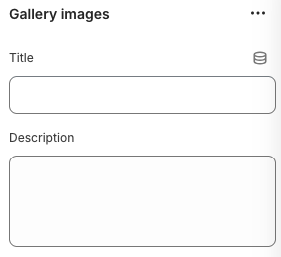
Title
- Main heading for the entire Gallery Images section
Description
- Brief introductory text for the section, displayed below the main title
Layout Settings
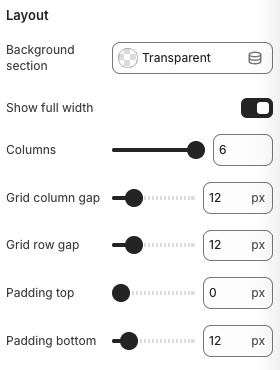
Background Section
- Background styling for the entire section
Show Full Width
- Controls whether the gallery spans the full width of the page
Columns
- Number of columns to display in the gallery grid
Grid Column Gap
- Horizontal spacing between columns
Grid Row Gap
- Vertical spacing between rows
Padding Top
- Top padding for the section
Padding Bottom
- Bottom padding for the section
Block Settings
Gallery Image Settings
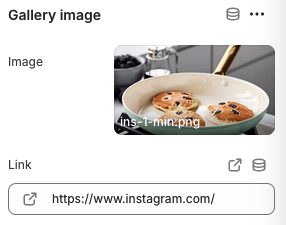
Image
- Format: JPG, PNG, WebP, SVG
- Recommended Size: Square format (1:1 ratio) for consistent grid appearance
- Description: The image to display in the gallery
Link
- The destination URL when the image is clicked
Best Practices
Image Selection
- Use high-quality, consistent images that complement your brand
- Maintain consistent aspect ratios for a uniform grid appearance
- Optimize images for web delivery to ensure fast loading
- Choose images that tell a cohesive story or showcase your products effectively
Layout Optimization
- Consider the number of columns based on your content and design goals
- Use appropriate spacing between images for visual balance
- Test the layout on different screen sizes to ensure good mobile experience
- Consider the full-width option for maximum visual impact
User Experience
- Ensure all image links work correctly and lead to relevant destinations
- Test image loading times and optimize for performance
- Consider adding alt text for accessibility
- Make sure images are clear and recognizable at different sizes
Content Strategy
- Curate images that align with your brand aesthetic
- Use the gallery to showcase lifestyle, product usage, or brand values
- Consider linking to social media for increased engagement
- Update images regularly to keep content fresh and engaging
Troubleshooting
Common Issues
Images not displaying
- Check if images are properly uploaded
- Verify image file formats are supported
- Ensure images are not corrupted
- Test image loading on different devices
Grid layout issues
- Check column count settings
- Verify grid gap values
- Test responsive breakpoints
- Ensure CSS is properly loaded
Links not working
- Verify URL is correctly entered
- Check for typos in the link
- Test link functionality
- Ensure no JavaScript conflicts
Mobile display problems
- Check mobile column settings
- Verify mobile gap values
- Test touch targets
- Ensure images are readable on small screens
Performance issues
- Optimize images for web delivery
- Reduce image file sizes
- Consider lazy loading for images
- Test page load times
Full-width layout issues
- Check full-width toggle setting
- Verify container CSS
- Test on different screen sizes
- Ensure proper responsive behavior