Product Collection Grid Section
This section displays products from a selected collection in a responsive grid layout with customizable styling options.
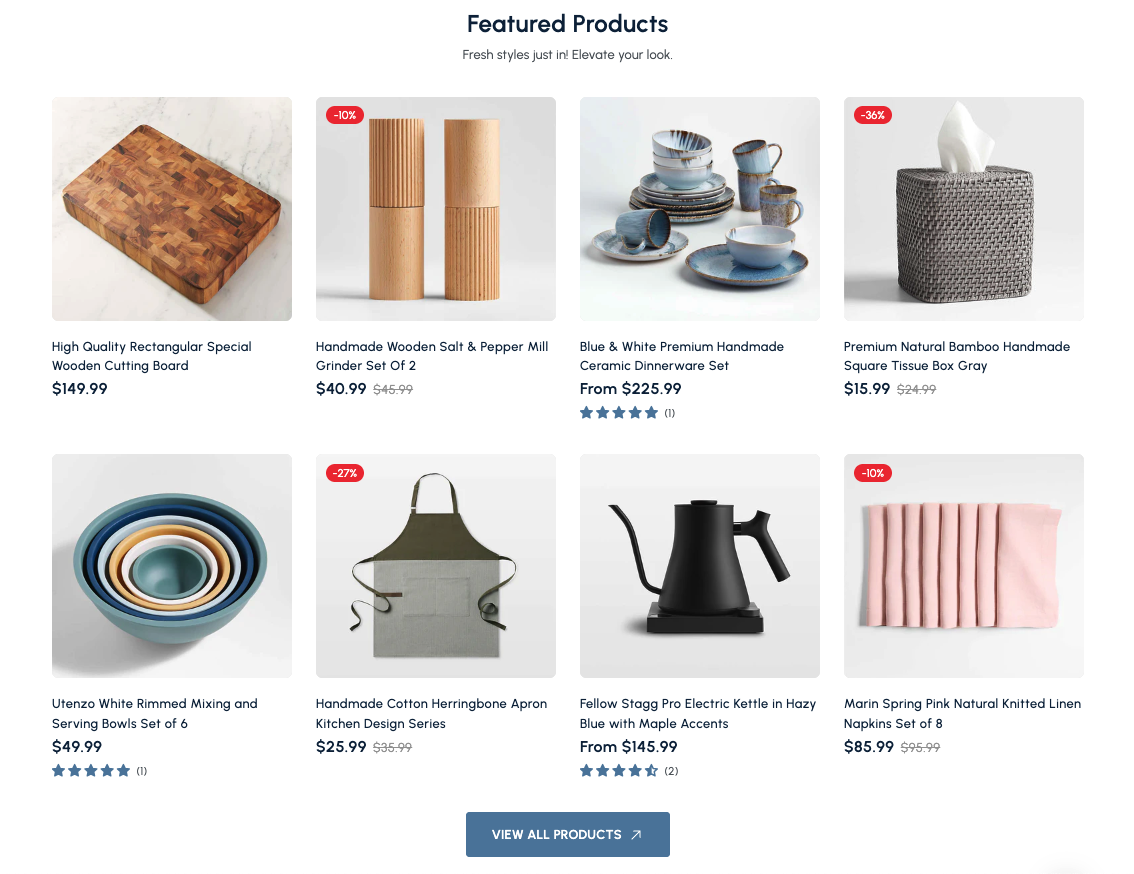
Overview
The Product Collection Grid Section is a versatile component that displays products from a specific collection in a clean, organized grid layout. Perfect for showcasing featured products, best sellers, or collection highlights, this section provides a traditional e-commerce browsing experience with modern styling options.
The Product Collection Grid Section offers a structured way to display multiple products from your collections. It features a responsive grid layout that automatically adapts to different screen sizes, making it easy for customers to browse and compare products efficiently.
How to add
Steps:
- In the theme editor (Customize), click Add section
- Select Product collection grid
- Save
Section Settings
General Settings
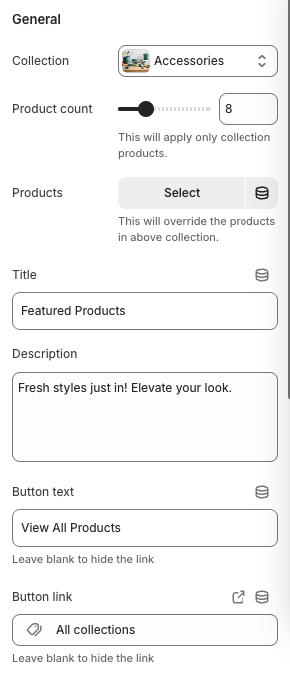
Collection
- Description: Select which collection to display products from
- Note: Products will be pulled from the selected collection
Product Count
- Note: This will apply only to collection products
- Description: Number of products to display in the grid
Products (Override)
- Note: This will override the products in the above collection
- Description: Manually select specific products to display
Title
- Main heading displayed above the product grid
Description
- Subtitle or descriptive text below the main title
Button Text
- Text displayed on the call-to-action button
Button Link
- Destination URL for the call-to-action button
Layout Settings
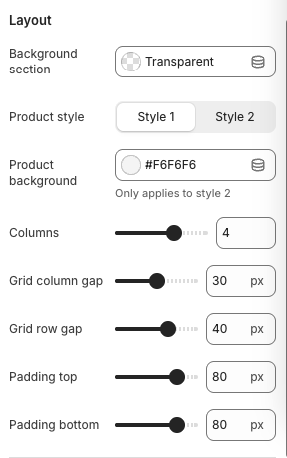
Background Section
- Background styling for the section
Product Style
- Options:
- Style 1
- Style 2
- Description: Visual style for product cards
Product Background
- Note: Only applies to Style 2
- Description: Background color for product cards
Columns
- Number of columns in the grid for desktop view
Grid Column Gap
- Horizontal spacing between columns
Grid Row Gap
- Vertical spacing between rows
Padding Top
- Top padding for the section
Padding Bottom
- Bottom padding for the section
Best Practices
Content Strategy
- Choose collections with high-quality product images
- Use descriptive, engaging titles
- Keep descriptions concise and compelling
- Select collections that align with your marketing goals
Product Selection
- Feature your best-selling products
- Showcase new arrivals or seasonal items
- Include products with good ratings and reviews
- Ensure product images are high-quality and consistent
Layout Optimization
- Use 4 columns for desktop to maximize space utilization
- Maintain consistent spacing between products
- Test different product styles for your brand
- Consider mobile viewing experience
Visual Design
- Ensure collection images have good contrast
- Use consistent image styles across all products
- Consider the overall color scheme of your theme
- Test the layout on different screen sizes
Performance
- Limit product count to 8-12 for optimal performance
- Optimize product images for web delivery
- Use appropriate image formats (WebP when possible)
- Consider lazy loading for better page performance
Troubleshooting
Common Issues
Products not displaying
- Verify the selected collection exists and has products
- Check collection visibility settings
- Ensure products are published and active
- Verify product images are uploaded
Grid layout issues
- Check column settings for desktop and mobile
- Verify grid gap settings are appropriate
- Test different product styles
- Ensure responsive breakpoints are working
Image display problems
- Check image dimensions and aspect ratios
- Verify image format is supported
- Ensure images are uploaded to Shopify
- Test image loading on different devices
Mobile responsiveness issues
- Check mobile column settings
- Verify mobile padding and gap settings
- Test on actual mobile devices
- Ensure touch targets are appropriately sized
Performance problems
- Optimize product images
- Reduce number of products if needed
- Check image file sizes
- Consider lazy loading implementation
Button not showing
- Verify button text is not empty
- Check button link is properly set
- Ensure button styling is not hidden by CSS
- Test button functionality