Typography
Customize global font families, heading scales, and text sizes across your storefront.
The Typography settings control the fonts used for headings, body text, and specialized elements throughout your theme. Adjusting these values ensures consistent branding and readable text across devices.
How to customize
Steps:
- In the theme editor (Customize), open the Theme settings tab.
- Select Typography.
- Modify the font families, sizes, or scaling options.
- Click Save to apply the changes globally.
Settings
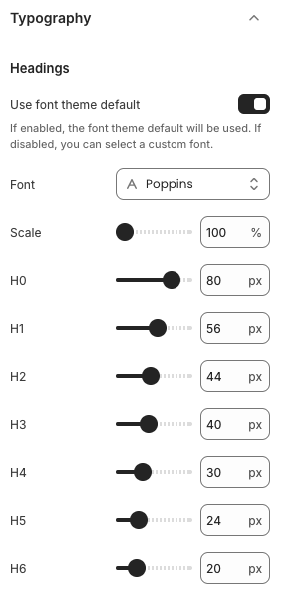
Headings
- Use font theme default: Enable to inherit the theme’s default heading font. Disable to choose a custom font.
- Font: Dropdown to select the heading typeface (e.g., Poppins, Inter, etc.).
- Scale: Percentage multiplier applied to heading sizes for quick adjustments.
- H0–H6 sliders: Control the pixel size for each heading level individually.
Body (if available)
- Use font theme default: Toggle to use the theme’s preset body font.
- Font: Choose the body typeface when the default is disabled.
- Scale / Base size: Adjust the primary body text size; other text elements scale accordingly.
Additional Text Styles
- Depending on the theme, you may find controls for buttons, navigation, or captions. These typically include font choice, weight, and size sliders similar to headings.
Best Practices
- Stick to two or three font families to maintain visual harmony.
- Balance heading sizes to create a clear hierarchy—H0/H1 should stand out while H5/H6 remain readable.
- Test typography on desktop and mobile; adjust scale if headings wrap awkwardly.
- Ensure line height and spacing remain comfortable after changing font sizes or scale.
Troubleshooting
Font not applying
- Confirm the “Use font theme default” toggle is disabled when selecting custom fonts.
- Some fonts require additional weights; ensure the chosen weight is available.
Text clipping or overlapping
- Reduce the heading size or scale percentage to prevent overflow in tight layouts.
Performance concerns
- Limit the number of external font families to reduce page load times; web-safe or system fonts load faster.